Gravel Calculator
Estimate gravel in cubic yards, cubic feet, tons, and pounds from your project measurements. Add a site allowance and local price to plan a driveway, path, patio base, drainage area, or landscape bed before ordering.
Calculate Gravel Quantity
Enter finished project dimensions. Results include your extra material percentage.
Weight varies with grading, moisture, void space, and compaction. Replace the default density with your supplier’s value when available.
How to Use the Gravel Calculator
Choose the area shape and units, measure the surface, and enter the installed depth. Select the nearest gravel type, then edit density if your supplier gives a product value. Add local pricing only when you want a cost estimate.
1. Measure the surface
Use length and width for a rectangle. For a circle, enter the diameter. Divide an irregular area into smaller shapes and calculate each part.
2. Enter the gravel depth
Use the compacted depth required for the project. Decorative cover, paths, driveways, and drainage work can require different depths.
3. Check volume and weight
Compare cubic yards and tons with the supplier’s sales unit, minimum order, delivery limit, and rounding method before purchasing.
How Much Gravel Do I Need?
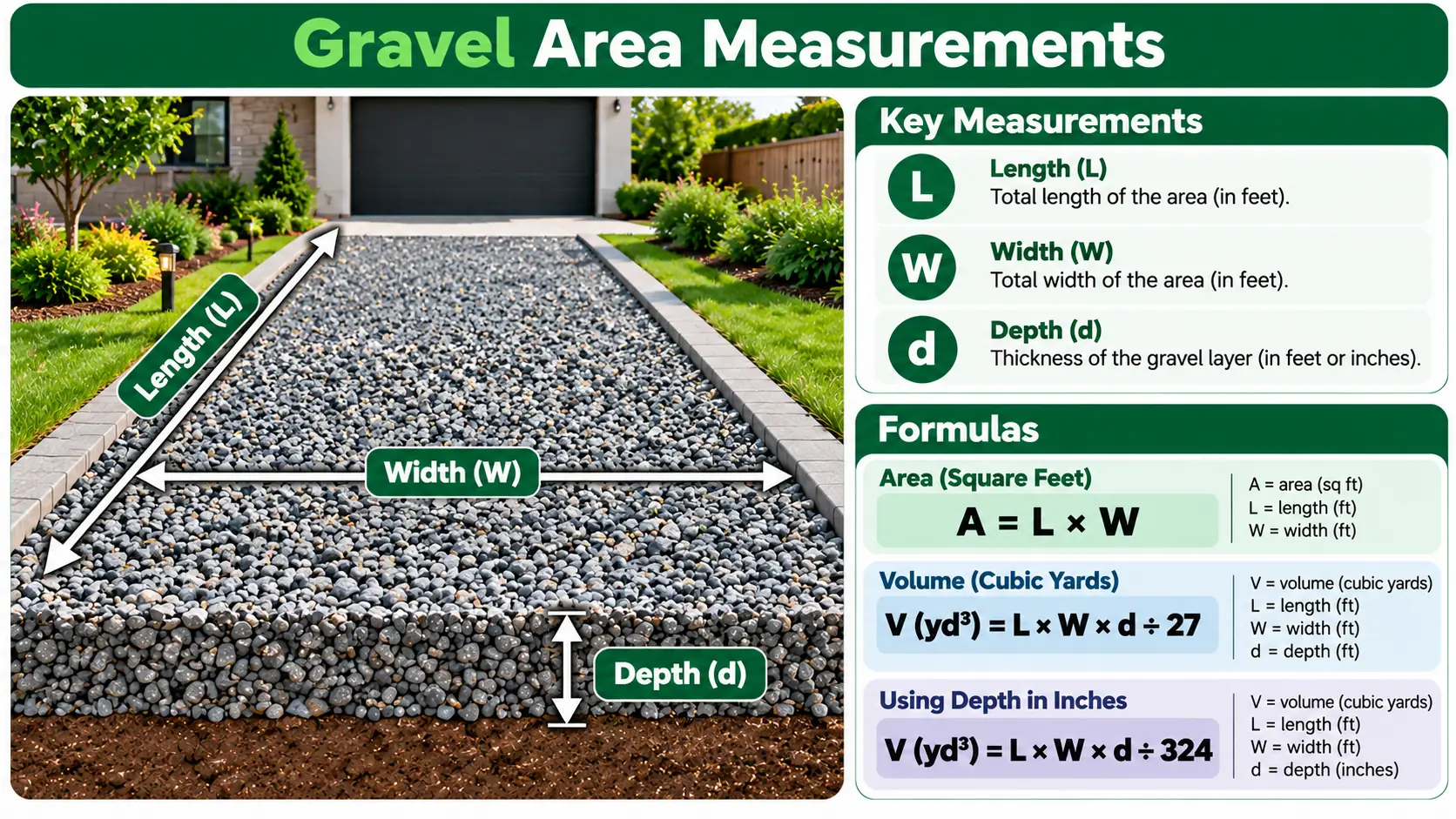
Gravel quantity starts with volume. The calculator converts all dimensions to feet, multiplies area by depth, and divides cubic feet by 27 to find cubic yards.
Weight is calculated after volume because equal volumes of different aggregates can weigh differently. The selected density converts cubic yards to estimated tons and pounds.
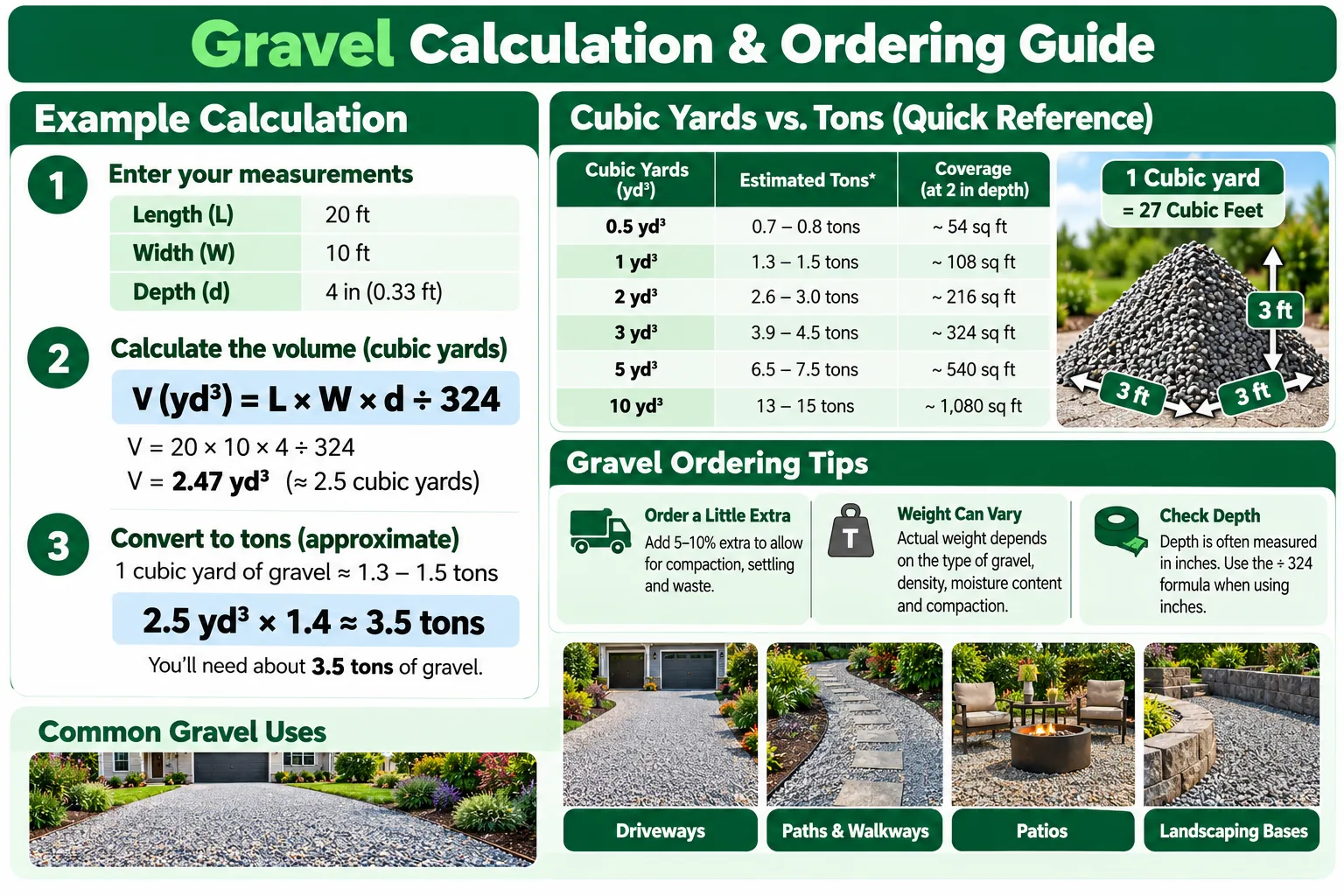
The extra material setting is applied after the base volume. It can account for uneven grading, compaction, small measurement errors, and handling loss. The correct allowance depends on the site and project.
Gravel Coverage by Area and Depth
Values show cubic yards before adding extra material.
| Area | 2 inches | 3 inches | 4 inches |
|---|---|---|---|
| 100 sq ft | 0.62 yd³ | 0.93 yd³ | 1.23 yd³ |
| 250 sq ft | 1.54 yd³ | 2.31 yd³ | 3.09 yd³ |
| 500 sq ft | 3.09 yd³ | 4.63 yd³ | 6.17 yd³ |
| 1,000 sq ft | 6.17 yd³ | 9.26 yd³ | 12.35 yd³ |
Gravel Density Presets
These are the same planning values used by the calculator. Actual bulk density varies with grading, moisture, void space, and compaction, so use the supplier’s value when available.
| Gravel type | Preset tons per yd³ | Planning note |
|---|---|---|
| General gravel | 1.40 | General estimate |
| Crushed stone | 1.50 | Denser graded aggregate |
| Pea gravel | 1.40 | Rounded small gravel |
| River rock | 1.40 | Confirm local product grading |
Gravel for Different Projects
Calculate separate layers when a project uses different aggregate sizes or densities.
Driveways
Measure each base and surface layer separately. Drainage, excavation, grading, and compaction should follow the project specification.
Paths and patios
Use the finished surface dimensions and the planned depth. Edge restraints and compacted base layers can change the order.
Drainage and beds
French drains, borders, and decorative beds use different stone sizes. Confirm whether pipe or other objects change the required fill volume.
Measurements, Assumptions, and Ordering
A calculator can apply the formula consistently, but the final order remains an estimate. Measure more than once, use finished depth, disclose the allowance, and confirm density and sales units with the supplier. This tool supports material planning and does not replace site design, drainage advice, permits, or engineering.
Gravel Calculator FAQ
How do I calculate gravel in cubic yards?
Multiply area by depth in feet to get cubic feet, then divide by 27.
How do I convert gravel yards to tons?
Multiply cubic yards by the gravel density in tons per cubic yard.
How much gravel covers 100 square feet?
At 2 inches deep, the base volume is about 0.62 cubic yard. At 3 inches, it is about 0.93 cubic yard.
Should I order extra gravel?
An allowance may cover uneven ground, compaction, and handling loss. Choose it from actual site conditions.
Can I estimate driveway gravel?
Yes. Calculate each layer separately when materials or depths differ.
Is the weight exact?
No. Weight is an estimate because density changes with stone grading, moisture, voids, and compaction.